


Your website may already look ready for enterprise clients.
The harder question is whether the setup behind it is ready for enterprise scrutiny.
That question often appears when a larger prospect brings security, IT, legal, or procurement into the buying process. Suddenly, the conversation moves beyond the homepage and product pages:
- Who owns the hosting, domains, code, content, forms, analytics, and security controls?
- Which people and suppliers can access each system?
- How are website changes tested, approved, released, and reversed?
- What data moves through forms and integrations?
- Can the company show evidence that an identified risk was investigated and corrected?
If the answers live in one person’s memory, across old email threads, or with several suppliers who each own only part of the picture, the website can become a source of uncertainty at exactly the moment the company needs to build trust.
In recent work with a B2B technology company, my team and I saw this happen in practice. An external security review raised issues across the public website and the infrastructure around it. The useful response was not to accept every automated finding blindly or to pass the report from one supplier to another. We had to verify the evidence, identify the responsible owner for each layer, coordinate access, improve the areas under our control, and organize the hosting transition so the result could be tested and demonstrated.
That experience reinforced a broader lesson: an enterprise-ready website is not defined by traffic, company size, or an expensive platform. It is a website the organization can understand, control, change, and defend with evidence.
Enterprise readiness is an operating model
It is tempting to treat “enterprise-ready” as a product tier. Buy enterprise hosting, add a security tool, enable single sign-on, and the website is ready.
Those tools may help, but they do not create clear ownership by themselves. A modern website sits between marketing, internal IT, a development partner, a hosting provider, and the other platforms the business already depends on. Enterprise readiness means the company can answer three questions:
- Who is responsible? Every important layer has a named business and technical owner.
- How is change controlled? Work can move from request to test to release without relying on improvisation.
- What evidence exists? The team can show what was checked, what changed, and whether the live result works.
That operating model matters even when the website itself is not unusually large.
Start with an ownership map
The most useful enterprise-readiness document is not a large technical manual. It is a simple ownership map.
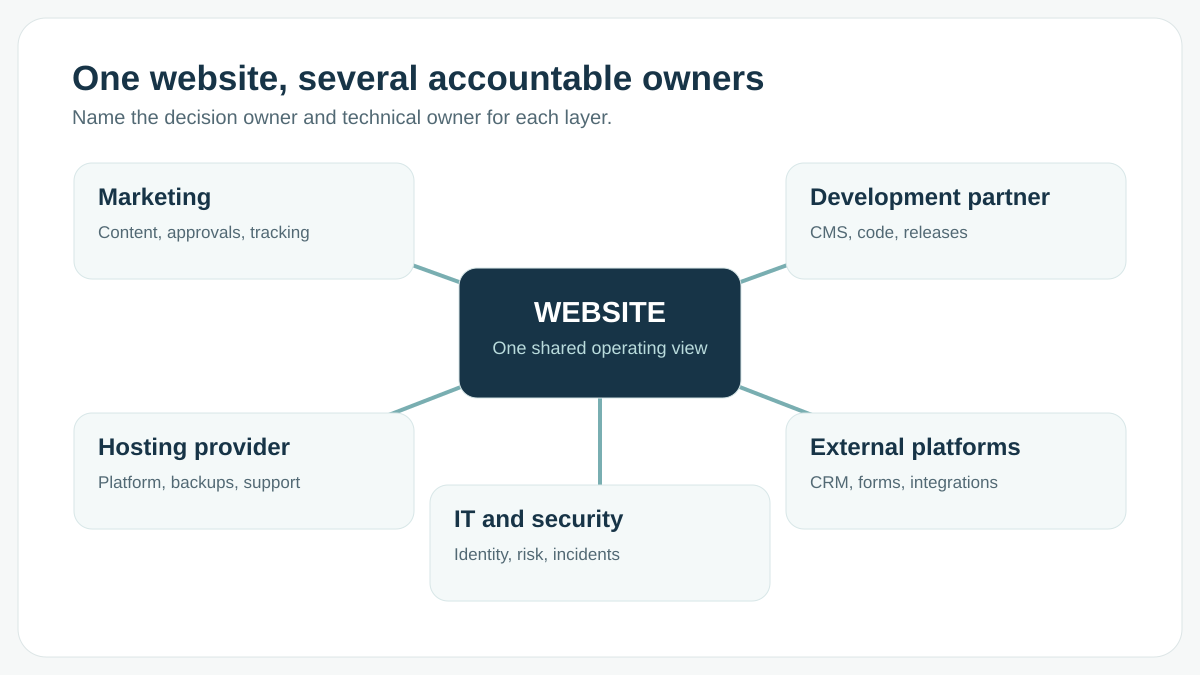
For each website layer, name the business owner, technical owner, supplier, access location, and escalation route. At minimum, include:
| Layer | Questions to answer |
|---|---|
| Domain and DNS | Who controls the registrar and DNS? Who approves a change? Who can recover access? |
| Hosting and delivery | Who manages the platform, certificates, caching, backups, capacity, and platform support? |
| WordPress or CMS | Who owns configuration, updates, users, plugins, and editorial permissions? |
| Code and releases | Where is the source of truth? Who reviews changes? How are they deployed and rolled back? |
| Content and brand | Who can publish? Who approves legal, product, localization, and brand-sensitive changes? |
| Forms and data | Where does submitted data go? Who owns consent, retention, delivery, and failure handling? |
| Integrations | Which external systems are business-critical? Who owns each connection and its credentials? |
| Analytics and tracking | Who approves tags? Who can verify that measurement still works after a release? |
| Security and incidents | Who investigates website findings, hosting findings, and corporate IT findings? Who coordinates the response? |
The purpose is not to make one team responsible for everything. It is to make the boundaries explicit.
In our recent review, that distinction mattered. Some findings belonged to website configuration, some required hosting-level action, and others could not be assigned until the affected service was identified. Treating them as one generic “website security” problem would have produced the wrong owners and unreliable fixes.
A scanner score is not the verdict
Enterprise prospects often use automated security-rating or vulnerability platforms. These tools can reveal useful issues, but a score alone is not an implementation plan.
A finding may refer to the website, its hosting network, a mail service, an old address, a shared system, or an asset the company does not control. The summary may omit the exact address, protocol, resource, version, or observation time needed to reproduce the issue.
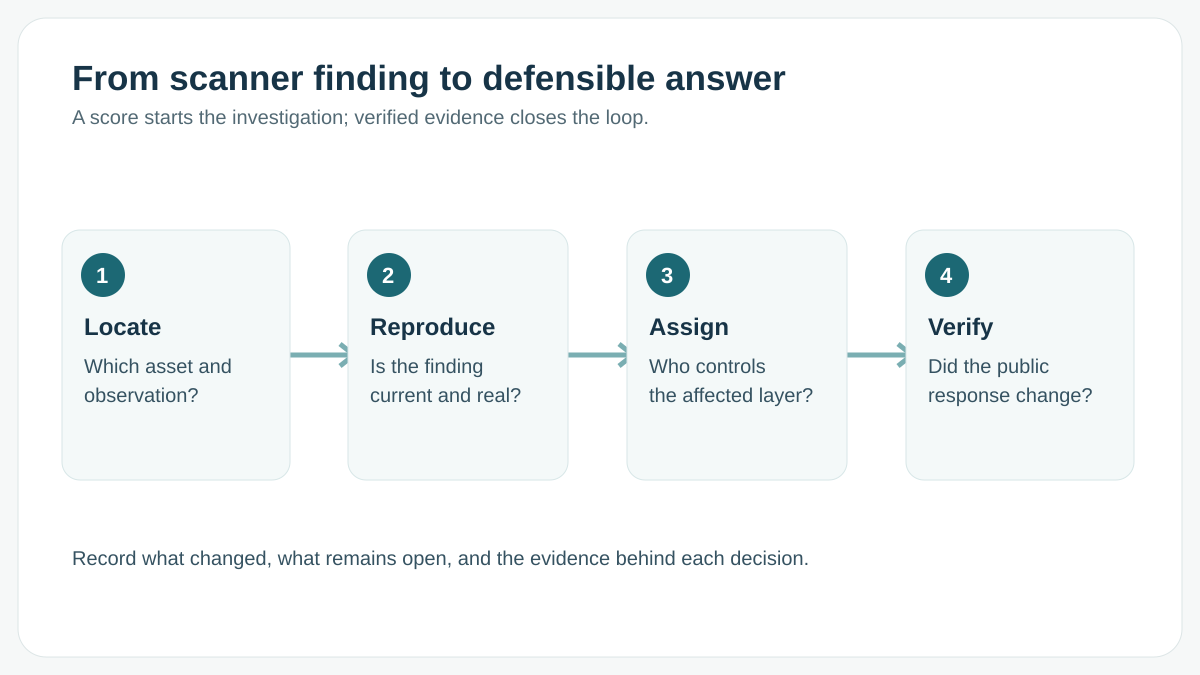
In that review, we did not start by installing a tool or by forwarding the report to the next supplier. We identified the asset, reproduced the behaviour with current evidence, and only then decided who could act. Some items were ours to correct. Some belonged to hosting. Some could not be assigned until we knew which service was actually affected. After a real change, we retested the public response once caches and delivery layers had refreshed, and we recorded what was verified, changed, deferred, or disputed.
That is slower than reacting to a headline score and faster than fixing the wrong system.
It also produces something enterprise buyers value: a defensible explanation. “We installed a security plugin” is a product statement. “We reproduced the finding, assigned its owner, applied the change, and verified the public response” is operational evidence.
Access that outlives the person
The same work required us to coordinate access before anyone could safely act. That problem is rarely a missing policy. It is an administrator login left over from a launch, a hosting account opened for one fix, or a former colleague whose account remains because nobody is sure what it controls.
What matters is not a longer password policy. The company needs to change suppliers, remove a former user, or recover a critical account without losing the website. Named accounts, limited to the work each person actually does, are what make that possible. Recovery access cannot depend on one employee or one supplier.
A release is not finished when the homepage loads
Enterprise marketing teams still need speed. A release process is not there to slow them down. It is there to make speed repeatable.
The failure is usually smaller than a missing handbook. The change is made directly on the live website, or it is tested on a staging site that no longer matches production. Someone loads the homepage, the page looks right, and the release is called done. The form, the translated page, the redirect, or the analytics tag is what actually changed, and nobody looked.
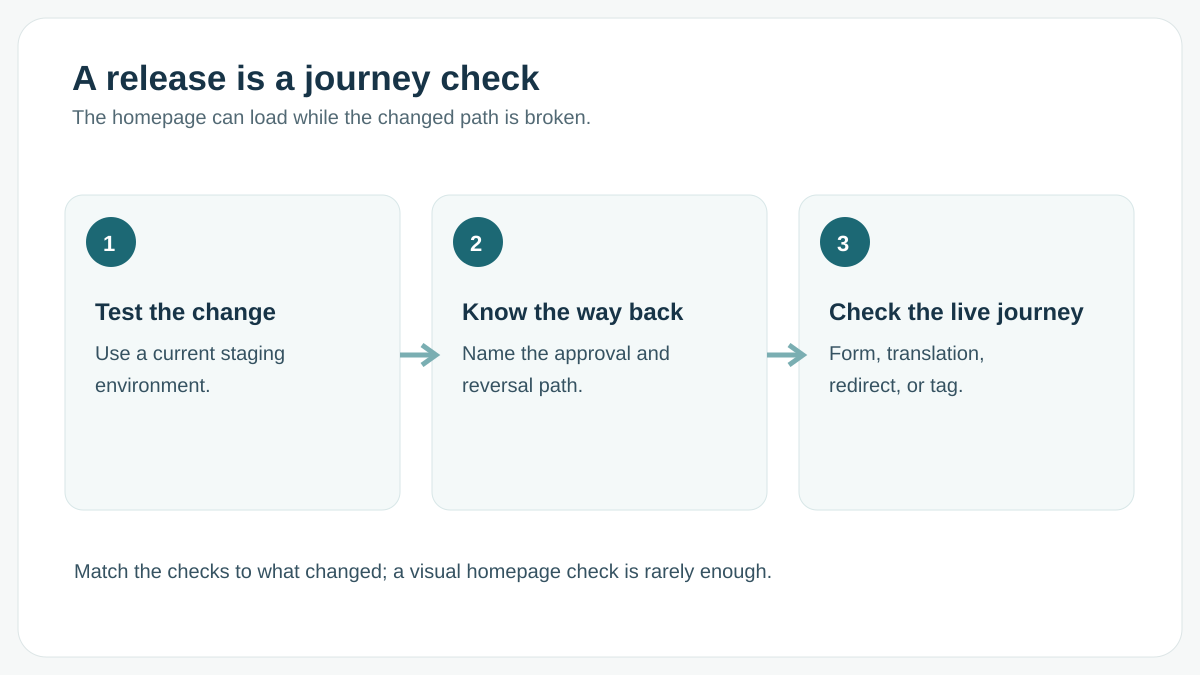
A material change needs a current place to test it, a known way back, and a check of the journey the change could affect. Correcting a label does not need the same care as moving the website or changing how customer data flows. Both still need a known path. If the team cannot say what will change, who approved it, and how to restore the previous state, the website is not ready for the questions an enterprise review will ask.
When the site is back, but nobody can explain why
Uptime monitoring answers one useful question: did the website respond?
In one incident we reviewed, the site had recovered, but the available logs could not identify the triggering action with confidence. Availability was back. The team still could not prevent the same incident, because they could not explain it.
“It works now” is not the same as “we understand what happened.”
The homepage can return successfully while a form fails, a certificate expires on another domain, or a CRM stops receiving leads. A list of plugin names will not show that either. Watch the journeys the business actually needs, and keep enough evidence to investigate. A form that quietly stops reaching the CRM is a broken customer journey even when every individual system looks healthy.
The cost shows up as slower change
The build or redesign budget is visible. The operating cost that follows is easier to miss.
When a website is difficult to change safely, marketing delays a campaign, editors build workarounds around a fragile template, and each new integration takes longer than the last. Human Made describes this as part of the total cost of ownership of an enterprise WordPress platform: the long-term cost includes how quickly the organization can launch new work safely, not only what it paid at launch.
Do not ask only, “Did the website launch on time and on budget?” Ask, “Is it becoming easier or harder for the organization to operate, change, and grow?”
A successful launch or migration can still leave that cost behind. Temporary addresses remain in content. Old accounts stay active. A production licence is still connected to the former environment. The work is not finished until those leftovers have an owner, including the ones the team has chosen to defer.
Where hosting fits
Hosting affects performance, capacity, backups, staging, monitoring, security controls, and support. It does not create the ownership map, the access decisions, or the evidence around the website.
I covered the infrastructure decision in Your Marketing Paid for the Click. Can Your WordPress Hosting Deliver? Use that guide when the review shows that the hosting layer itself needs to change.
Changing development partners is a different question. A disorganized website is not proof that it must be rebuilt, and a partner change is not the same project as this operating model. I covered that handover in Changing Your WordPress Development Partner Without Rebuilding the Website.
Eight questions before the next enterprise review
Before the next large prospect, security questionnaire, or major launch, ask:
- Can we name the business and technical owner of every critical website layer?
- Can we remove a person’s access without losing control of the website?
- Can we release and reverse a material change without improvising?
- Do we know where form and customer data travels, and who owns a failure?
- Can we reproduce an external security finding before we change the site?
- Can our logs explain a business-impacting failure, not only confirm that the site is back?
- Have we tested a realistic recovery path, not only stored a backup?
- Is the website becoming easier to operate, or is every release getting heavier?
You do not need perfect answers before speaking to enterprise clients. You do need to know which answers are missing, who owns them, and how they will be improved.
Build trust behind the website, not only on it
Enterprise buyers will still judge the clarity of the message, the quality of the product story, and the experience of the website.
Their wider teams may also judge whether the website is operated like an important business system.
AXE-WEB helps B2B marketing teams review and organize WordPress websites for that scrutiny—from ownership and access through releases, security coordination, and live verification.
Is your website becoming part of enterprise sales, procurement, or security conversations?
Frequently asked questions
There is no single plugin, host, or certification that makes WordPress enterprise-ready. The website needs a suitable technical foundation and an operating model around it: clear ownership, controlled access, a release the team can reverse, and evidence that an important change actually worked on the public site.
The appropriate depth depends on the website’s business importance, data, traffic, integrations, regulatory context, and client requirements.
Not automatically. A suitable hosting plan should follow the website’s workload, risk, support, recovery, and regional requirements—not the label on the plan.
A high-end platform cannot compensate for shared credentials, unclear ownership, or a release nobody can explain. See the AXE-WEB WordPress hosting guide for the infrastructure decision.
No. A scanner can identify signals worth investigating, but the result may not explain which asset, owner, or business workflow is affected. A finding still has to be reproduced, assigned, and retested.
Enterprise readiness also includes decisions a scanner cannot make, such as who may approve access and who coordinates suppliers when a finding crosses teams.
Usually, ownership is shared. The hosting provider may control platform and network protections. A development partner may own WordPress, plugins, custom code, and release verification. Internal IT or security may own corporate identity, DNS policy, risk acceptance, and incident governance. Marketing may own content, tracking requirements, and publishing decisions.
The important step is to define those boundaries in advance and name one coordinator for issues that cross them.
Often, yes. Start by naming owners, removing access that no longer has a purpose, and making the next material change reversible and verifiable.
A rebuild may be justified when the current technology cannot meet verified requirements. Poor organization is not that proof. If the real question is a change of development partner, see Changing Your WordPress Development Partner Without Rebuilding the Website.