


You have already paid for the visit. Can your website complete the journey?
That is the practical reason hosting matters.
A business may invest every month in paid campaigns, creative, content, SEO, marketing technology, and sales follow-up. But when a potential customer clicks, all of that work reaches one critical point: the website.
If the page loads slowly, fails during a traffic spike, shows broken content, or lets a form appear to submit without delivering the enquiry, the campaign has generated attention that the website cannot reliably turn into an opportunity.
In my work with marketing teams, I often see hosting blamed for every website problem—or ignored completely. Neither approach is useful. Website code, plugins, integrations, images, tracking tools, and poor configuration can also create problems. But hosting is the foundation on which all of those parts have to operate.
For a larger WordPress website, choosing that foundation only by monthly price can become an expensive saving.
Why hosting belongs in the marketing plan
Marketing teams often treat hosting as an IT expense because visitors never see the server. They do see the consequences.
They experience how long it takes before a page becomes useful. They experience whether the website stays available when a campaign sends a sudden wave of traffic. They experience whether search, forms, gated content, checkout, and other important actions work when requested.
Google Ads describes effective landing pages as important to conversions and recommends improving mobile landing-page speed. Loading experience is also considered as part of landing-page experience in Google Ads.
Moving to a new host does not automatically increase conversion rates. It gives the website a stronger opportunity to do its job after the marketing team has earned the click.
The useful question is not only “How much does hosting cost?” It is also:
- How much do we spend each month bringing people to the website?
- What is a qualified enquiry, application, booking, or sale worth?
- What happens when the website is slow or unavailable at the moment of interest?
- How much marketing, development, and IT time is repeatedly spent on avoidable website problems?
For many organisations, suitable hosting costs much less than the campaigns and business activity that depend on it.
When a larger WordPress website outgrows its hosting
A small brochure website and a business-critical WordPress platform do not place the same demands on hosting.
A larger website may have multiple editors, languages, forms, integrations, scheduled updates, analytics tools, search features, and thousands of pages or media files. It may receive campaign traffic, search-engine visits, bots, and AI crawlers at the same time.
The homepage may still look fast because it has been saved and prepared for quick delivery. Meanwhile, actions that need fresh information—such as forms, search, checkout, personalised pages, and WordPress editing—can be slowing down behind the scenes.
That is how a website can appear healthy in a quick test while failing at the exact point where a visitor is trying to convert.
Warning signs marketers can recognise
- The website becomes slow or shows error pages during busy periods.
- The homepage is fast, but forms, search, checkout, or page editing are slow.
- Images, layouts, or scripts break occasionally and return after somebody clears the cache.
- Different visitors see different versions of the same page.
- The team repeatedly needs a developer or internal IT specialist to restart, clean, or rebuild something.
- Updates are made directly on the live website because there is no safe place to test them.
- Backups exist, but nobody is confident about what they contain or how quickly the website could be restored.
- Monthly traffic appears reasonable, but short campaign, bot, or crawler spikes still cause failures.
These signs do not prove that hosting is responsible. They do show that the full website setup needs to be investigated instead of accepting “it works now” after another temporary fix.
Website problems that can point to a hosting issue
These anonymized examples come from situations my team and I have investigated for larger WordPress websites.
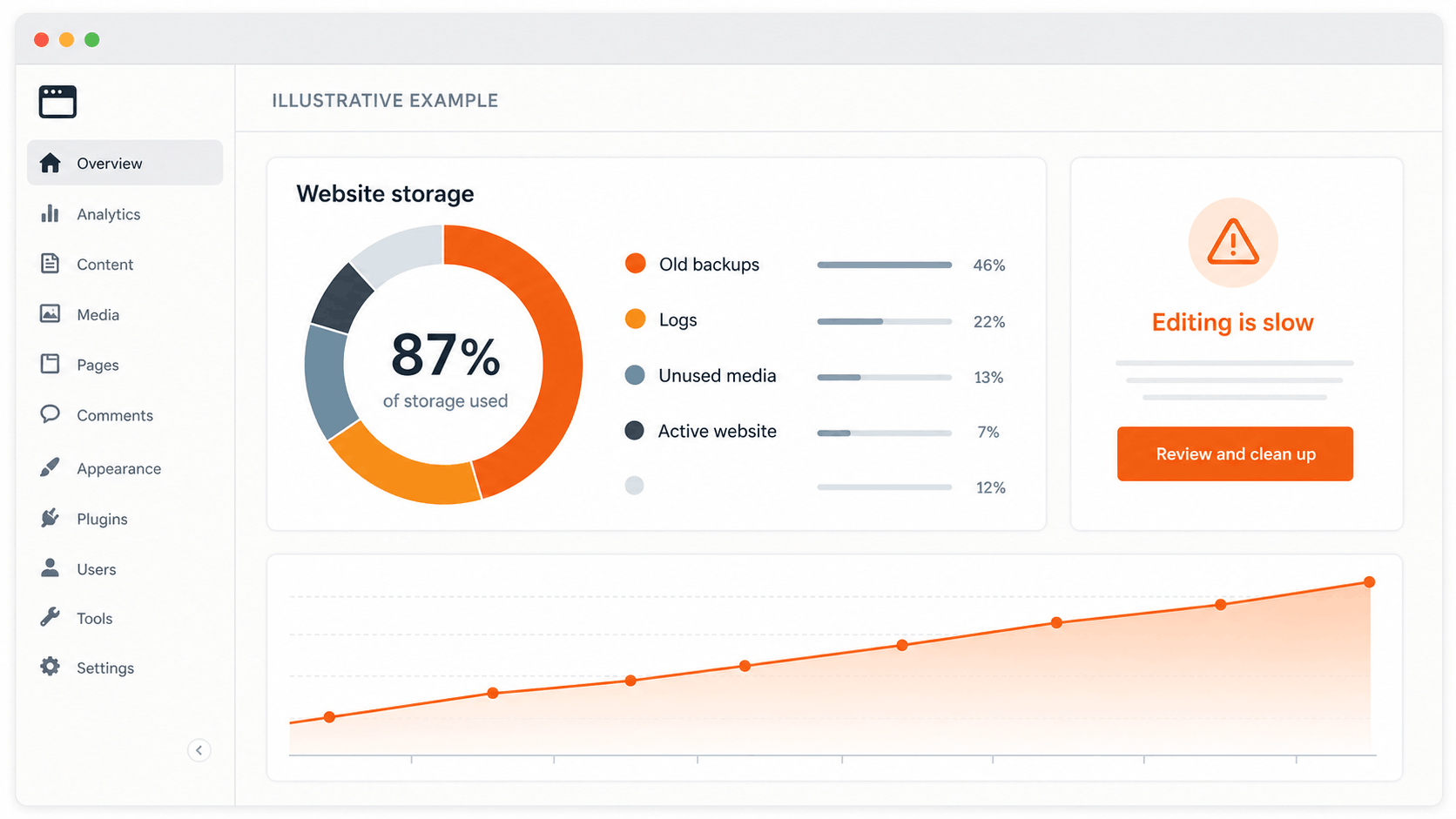
1. The website became slow because years of clutter were never managed
On one website I reviewed, years of old files, logs, unused copies, and unnecessary information had accumulated. The marketing team felt the effect when routine WordPress editing became painfully slow and parts of the homepage occasionally broke.
On paper, the server appeared powerful enough. In practice, nobody was actively maintaining the environment as a WordPress platform.
The answer was not simply to buy more server space. The site needed careful cleanup, better visibility, dependable backups, monitoring, and hosting support that understood WordPress.
2. Bots and AI crawlers created traffic the marketing reports did not show
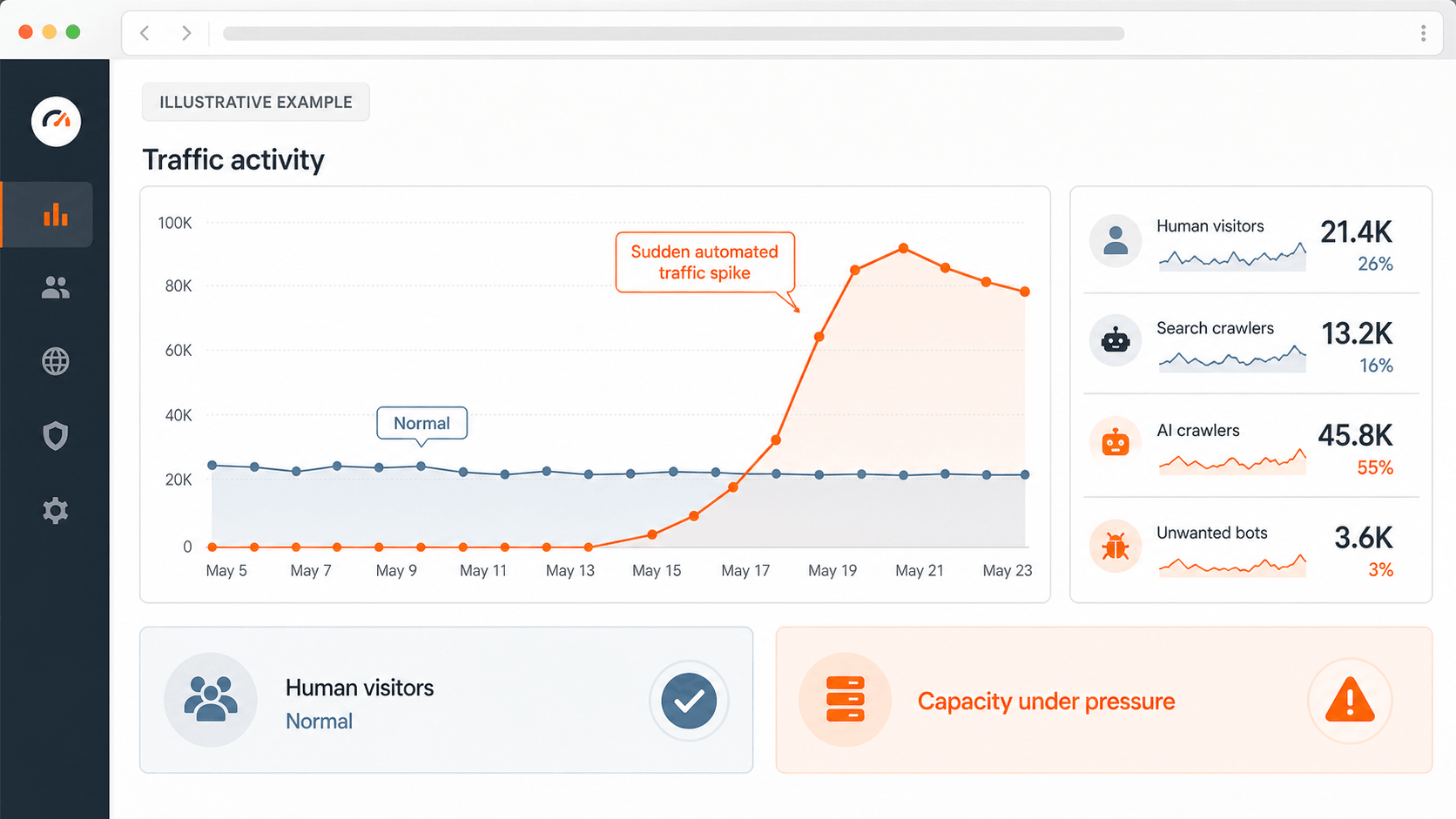
Automated traffic is becoming a more important part of website capacity planning. Search crawlers, security bots, AI crawlers, and other automated services can request many pages in a short period—even when the number of human visitors looks normal.
In one case, the website remained generally available, but these sudden bursts used up the resources needed to answer every request. Some visitors received errors even though the monthly traffic report did not appear alarming.
This is why a hosting decision should consider busy moments and automated traffic, not only the average number of human visits.
3. A quick fix kept hiding the real problem
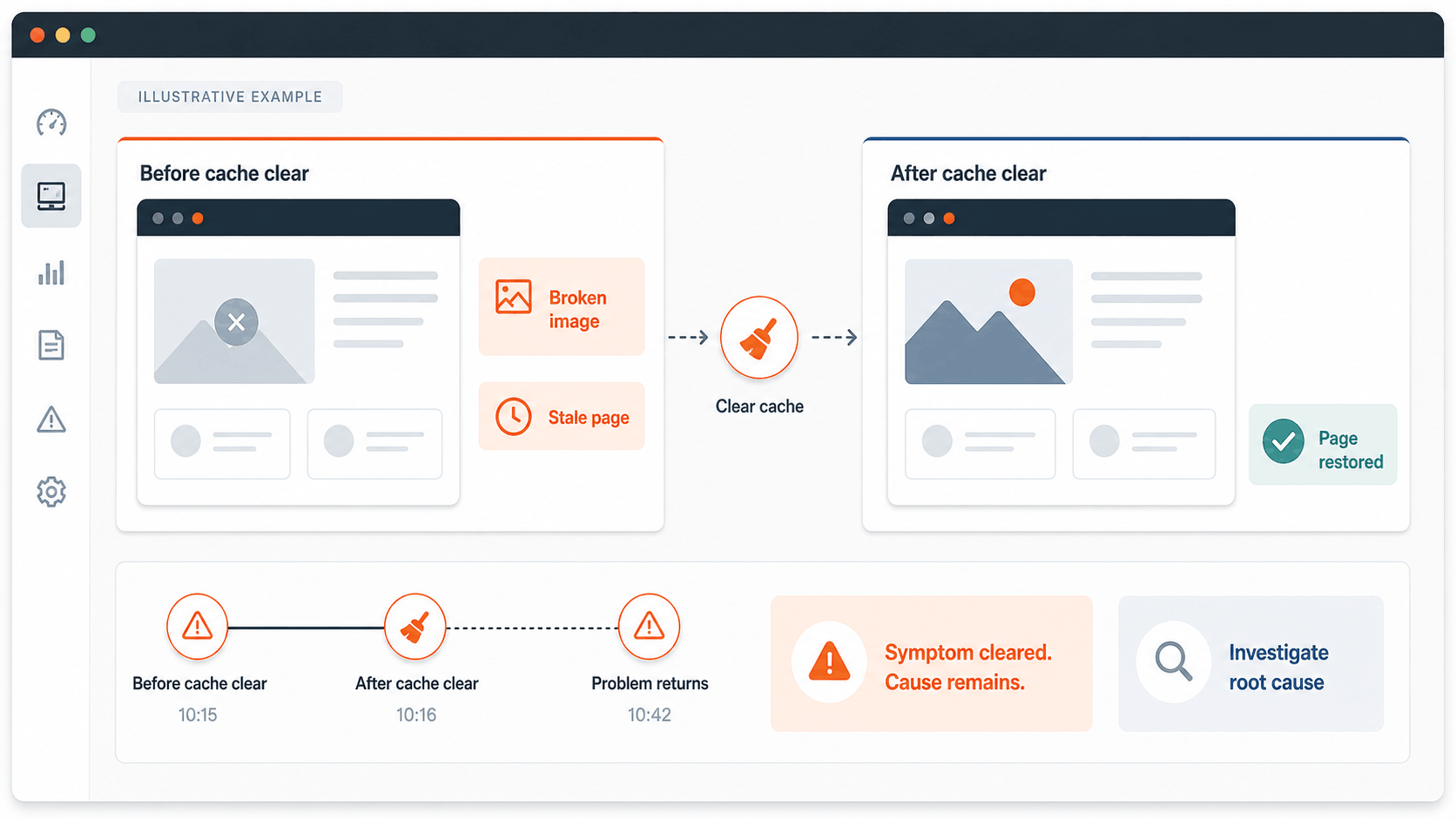
We have also seen websites where broken images or outdated pages returned to normal after the cache was cleared. Because the website looked fixed, the deeper cause was left in place—and the same problem returned later.
A cache clear can be a useful action, but it is not always a complete solution. Recurring problems may come from the website, its hosting setup, or the way several delivery services interact. Someone still needs to find and correct the cause.
How managed WordPress hosting makes the website easier to run
This is where I often recommend evaluating managed WordPress hosting. It gives marketing and web teams a platform designed around WordPress, rather than leaving the company to assemble and maintain every hosting function itself.
That can make everyday website management much simpler and reduce how often the wider company IT team needs to become involved in routine website incidents.
Depending on the provider and plan, managed WordPress hosting can provide:
- Faster delivery for repeat visits. WordPress-specific caching and a content delivery network help pages and files reach visitors efficiently.
- A safe place to test changes. Staging and development environments let teams check updates before they affect the live website.
- Practical backups and restore points. The team has a clearer recovery path if an update or change goes wrong.
- Monitoring and clearer reporting. It is easier to see when the website is running out of capacity or where a slowdown may be happening.
- Security at the hosting level. The provider manages important protections and platform updates while the website team remains responsible for WordPress, plugins, and custom functionality.
- Support that understands WordPress. The support team is more familiar with common WordPress, caching, domain, and server problems than a general-purpose hosting provider.
- Room to choose the right level of service. The plan can reflect real traffic, website activity, storage, and business risk.

A self-managed or general-purpose server can be configured to provide many of these things. The difference is that somebody inside or outside the company must continually maintain, monitor, secure, and support it.
Managed hosting does not replace a development partner. It does, however, give that partner a stronger platform and can make issues much easier to manage without involving the full company IT team every time something happens to the website.
The hosting provider looks after the platform. A development partner still investigates custom code, plugins, forms, CRM connections, analytics, and the complete visitor journey. The two roles work best together.
Hosting location should follow your audience
A content delivery network, or CDN, can deliver common website files from locations closer to visitors. This improves speed and reduces pressure on the main server.
But it does not make the server’s location irrelevant. Forms, search, checkout, WordPress editing, personalised content, and other live interactions may still need to communicate with the main hosting location. Greater distance can add delay.
Choose the hosting region using the location of your most important visitors and campaigns—not the location of the website owner or developer. Then test the pages and actions that matter from the actual markets you serve.
If the website serves several regions, the decision may also need to consider data-residency rules and how much of the experience changes for each visitor.
Why we often evaluate WP Engine and Kinsta
For suitable larger WordPress websites, two of the managed platforms I often evaluate with clients are WP Engine and Kinsta.
Both offer WordPress-focused hosting with tools for caching, content delivery, backups, staging, monitoring, security, and specialist support. Their exact features, capacity, locations, support options, and pricing depend on the selected plan.
We do not recommend choosing between them from a generic “best hosting” list. The right option depends on the website’s traffic, important visitor regions, integrations, publishing process, recovery requirements, support expectations, and budget.
Managed WordPress hosting is also not automatically the same as having a dedicated server. Some larger or busier websites may need dedicated resources, but that decision should follow evidence about the real workload.
Before moving your WordPress website
When I plan a migration, I do not treat it as simply copying the website and hoping everything still works.
The existing site should remain available while the new environment is prepared. Pages, forms, integrations, emails, analytics, and important visitor journeys should be tested before traffic moves. The old environment should remain available temporarily in case a rollback is required.
Before choosing a plan or starting a migration, ask:
- Which customer journeys cannot be allowed to fail?
- Where are the visitors and campaigns that matter most?
- What happens during busy periods, not only in the monthly average?
- Which website actions need live information and cannot be prepared in advance?
- How much downtime or data loss could the business tolerate?
- Is there a realistic testing and approval process?
- Who will be responsible for WordPress, custom features, integrations, analytics, and ongoing monitoring?
Sometimes the answer is to improve the current environment. Sometimes it is a move to managed WordPress hosting. Sometimes a larger website needs dedicated resources. The recommendation should follow the website’s real needs, not a fashionable provider name.
Protect the traffic you are already paying to earn
Your hosting should help the website absorb attention – not become the point where that attention is lost.
AXE-WEB team can review your WordPress website, traffic geography, recurring problems, and conversion-critical journeys; recommend an appropriate hosting setup; and manage a controlled migration with backups, testing, launch coordination, rollback, and post-launch checks.
If you need help with WordPress hosting, migration, performance, integrations, or ongoing development, talk to AXE-WEB.
Frequently asked questions about WordPress hosting
These questions reflect the practical concerns clients raise when website performance, capacity, cost, or migration becomes a business discussion.
Yes, but hosting is a foundation—not a shortcut to rankings or AI citations.
Google uses Core Web Vitals in its ranking systems, while making clear that strong performance scores do not guarantee top positions. Google also says that its established SEO best practices remain relevant for AI Overviews and AI Mode, with no special technical requirements or unique “AI schema” needed.
You may hear terms such as GEO (generative engine optimization), AEO (answer engine optimization), or simply AI search visibility. The terminology is evolving, but the useful principles are familiar: the website must be available to crawlers, pages must load reliably, and the content must be clear, useful, trustworthy, and easy to understand.
The right hosting supports that technical foundation. It cannot make weak content authoritative or guarantee that a search engine or AI system will feature it.
Do not assume that every slow or broken website needs to move. Similar symptoms can come from the hosting platform, WordPress, plugins, custom code, caching, large media files, tracking scripts, or an external service.
Start with the pattern: Does the problem happen only during busy periods? Does the homepage work while forms or search fail? Does clearing the cache help only temporarily? A developer or technical partner can compare website behaviour with hosting data and identify which layer is responsible before recommending a solution.
Server size is only part of the value. Clients often discover that the real cost sits in maintaining the environment, finding recurring problems, managing security, testing changes, recovering from failures, and repeatedly involving developers or the internal IT team.
Managed WordPress hosting packages many of those operational capabilities around WordPress. The business case is not simply “more server.” It is a website that is easier to operate, support, test, and recover.
They can. Automated services may request many pages in a short period, even when marketing reports show an ordinary number of human visitors. That activity can compete with real visitors for website resources.
The answer is not necessarily to block every bot or buy the largest plan. The website team should understand which automated traffic is useful, which is unwanted, what happens during short spikes, and how the hosting platform manages them.
Monthly visit totals do not show what happens when many visitors arrive at once. Before a high-value launch, review real traffic patterns, recent errors, and available capacity. For an important or unusually large campaign, a controlled load test can show how the website behaves under pressure before real customers arrive.
Testing should include the actions that matter—not only loading the homepage. Forms, search, checkout, and integrations need to keep working too. The hosting provider and development partner should agree in advance how they will monitor the launch and respond if demand exceeds the plan.
No. “Managed” describes the WordPress-focused service, tools, and support around the website. “Dedicated” describes resources reserved for a particular customer or workload.
Many larger websites work well on managed plans without dedicated resources. A very busy, complex, or business-critical website may need both. The decision should be based on evidence from the real workload.
Not always. A better platform may remove hosting limits, but slow code, oversized images, unnecessary plugins, database clutter, tracking scripts, and external integrations can move with the website.
A credible migration recommendation identifies the likely constraints first. After a move, performance should be measured with comparable real-world data, especially when other improvements happen at the same time.
A poorly planned migration can. A controlled migration reduces the risk by keeping the existing website live while the new copy is prepared, testing important pages and forms, moving traffic during a suitable window, and retaining a rollback option until the new environment is verified.
The exact risk and timing depend on the website. No provider or development partner should promise one universal migration time for every project.
No, but it can reduce how often the wider IT team needs to become involved in routine website incidents.
The hosting provider manages the platform and helps with hosting-level issues. A development partner remains responsible for WordPress configuration, custom code, plugins, forms, CRM connections, analytics, and testing the complete visitor journey. Clear ownership between those roles prevents problems from being passed between suppliers.