

An urgent website request often arrives as one short message:
“The form is not working.”
“The campaign launches today and the page is broken.”
“Customers are being redirected somewhere else.”
“Google is reporting a problem.”
Behind that message may be lost leads, an interrupted campaign, a security concern, a damaged customer journey or a deadline that cannot simply move. The client needs action, and the response needs to be both fast and controlled.
At AXE-WEB, urgent support is part of the ongoing development relationship. We do not treat maintenance, troubleshooting and new development as disconnected services. The same team that helps improve the website also understands how it operates, responds when something goes wrong and leaves it in a safer state after the immediate problem is resolved.
Our delivery work is increasingly AI-assisted: AI helps gather context, compare recent changes, prepare a fix and draft the update on a development preview. A person still reviews the result, approves it and owns the communication — before anything is released. That combination is what lets a clearly scoped change move quickly without turning into a reckless live edit. How that operating model works day to day is described in Why WordPress Still Has a Future in an AI-Driven Workflow.
Not every “urgent” request is the same
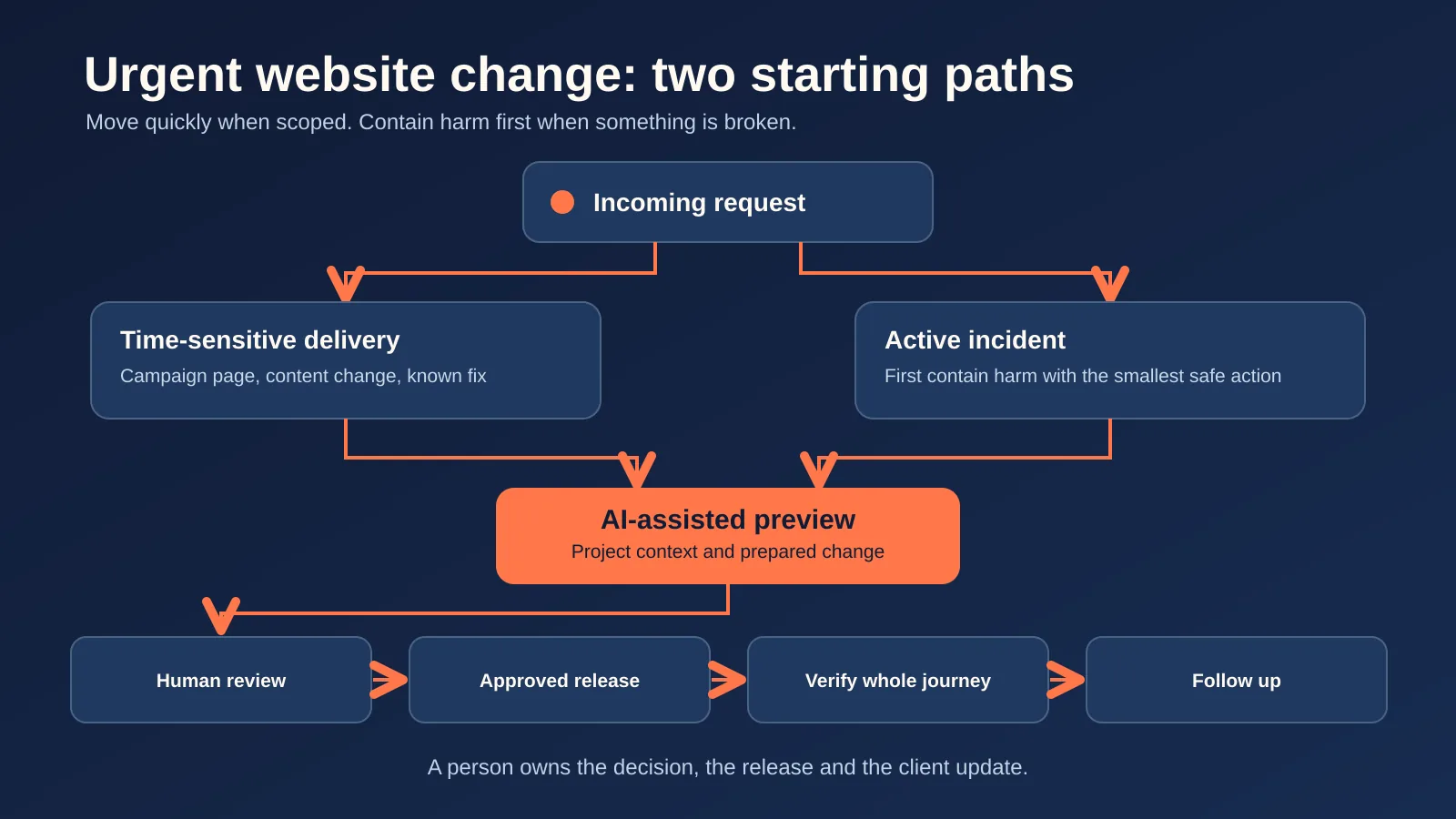
“Urgent” should describe business impact, not simply the number of exclamation marks in a message. In practice, urgent requests fall into two paths.
1. Time-sensitive delivery. The website is working, but something must change soon: a campaign page, a content update, a known fix, a tracking repair before a launch. Because the project context is already in place, this path can move fast: AI-assisted work happens on a development preview, a person checks the whole journey, and then the change is released.
2. An active incident. Something is already harming the business: the website or an important section is unavailable; a contact, registration or checkout form is failing; visitors are seeing incorrect, sensitive or misleading content; the site is behaving suspiciously or may be compromised; a third-party change has interrupted an important journey; search engines are receiving an incorrect technical signal from the live site.
An incident starts differently: first reduce the harm with the smallest safe action, then use the same preview, human review and release path for the lasting fix. When the site may be compromised, that path follows the recovery sequence in Your WordPress Website Was Hacked. What Happens Next? rather than repeating it here.
Other requests may feel urgent because somebody needs them today, but the website is still operating correctly. Those still deserve a prompt response, yet they are planned as fast delivery rather than as an incident.
What happens after the request arrives?
The client does not need to follow our internal runbook. What the client should see is this: what is affected, what we are doing, what a person has verified, and what still depends on another platform.
1. We clarify what is affected. The visible symptom is not always the real problem. A broken button may affect one secondary page or the main conversion path of a paid campaign. A search warning may reflect an old report or an active indexing problem. Before deciding what to change, we establish which URL, feature or journey is affected, what the visitor experiences, what should happen instead, when it began, who is affected, whether a launch or customer process is at risk, and which recent changes may be relevant.
2. We secure access and preserve evidence. Urgent work often slows down because nobody knows who controls the hosting, domain, analytics account, CMS or third-party integration. Access should be shared securely and with the minimum permission needed for the task. Passwords should not be passed casually through email or chat. Where possible, create a named account, use time-limited access or grant a scoped role that can later be reviewed or removed. We also preserve useful evidence before it disappears: screenshots, error messages, timestamps, logs, recent-change history and, when relevant, a recoverable copy of the affected state.
3. We prepare the fix on a preview and a person approves the release. For a scoped delivery task, AI-assisted work happens on a development preview and a person reviews it before release. For an active incident, the first useful action may be a narrowly scoped step that reduces harm — restoring the previous working version, disabling one failing component, correcting one configuration or protecting an affected route. The broader fix then follows the same route: preview, human review, approved release with a practical rollback path. Direct live edits stay the exception for containing active harm, not the default.
4. We verify the whole journey. A change is not complete because one page looks correct in the editor. Verification follows the business journey: desktop and mobile behavior, the public logged-out page, forms and confirmation messages, CRM and email delivery, analytics and campaign attribution, checkout or registration flows, cache behavior, and search-engine-facing responses when SEO is involved. For a connected website, the problem can sit between systems — the page may render correctly while the lead never reaches the CRM.
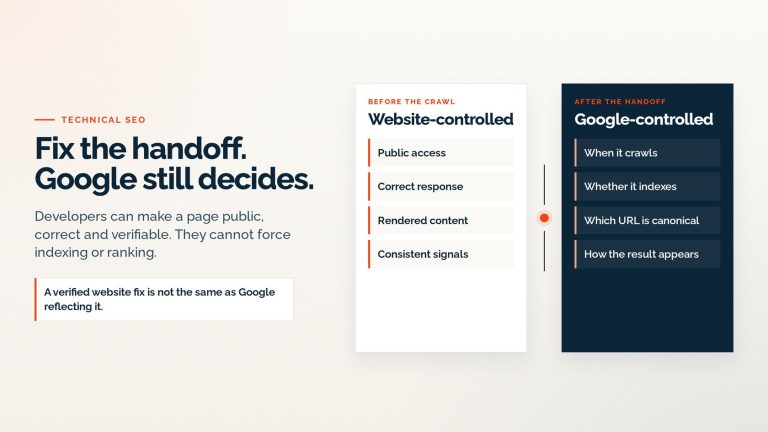
5. We communicate what is known — and what is not yet known. Clients should not have to guess whether anybody is working on the problem. A responsible update explains what has been confirmed, what immediate action was taken, whether the impact is contained, what still needs investigation or monitoring, whether a hosting provider, search engine or another third party controls part of the timeline, and what the client should do — or avoid doing — while work continues. Sometimes our technical change is complete quickly while an external platform still needs time: Google may need to recrawl a page, a DNS change may need to propagate, a CRM or security provider may need to review its own system. We separate our work from those external timelines rather than promising a result we do not control.
6. We close the loop after the immediate fix. Urgent support should not end with “it works now.” When the situation is stable, we consider what most likely caused the problem, whether the fix is permanent or temporary, whether related pages or integrations carry the same exposure, what should be documented, whether access, monitoring, backups or release practices should change, and which improvement would reduce the chance or impact of a repeat.
Where AI helps, and where a person decides
AI can speed up urgent work, but it does not own the result.
AI can help gather the project context, compare recent changes, prepare a fix on the preview, re-check the affected journey and draft the client update. A person still decides the business impact, whether production may be touched, what is in scope, what the client is told and whether the result is approved for release.
We do not claim that every incident is automatic, and we do not promise resolution times before the scope is clear.
What information helps us respond faster?
You do not need to diagnose the issue before contacting us. A short, structured message is enough.
Include, when available:
- the affected URL;
- what you expected to happen;
- what happened instead;
- when you first noticed it;
- who is affected;
- screenshots, screen recordings or the exact error text;
- recent content, plugin, campaign or account changes;
- the business deadline or journey at risk;
- who controls the required website and platform access.
Avoid sending passwords in the message. Tell us which systems are involved, and we can agree on a secure access method.
If details are incomplete, that should not stop you from reporting the issue. It simply means the first step will include gathering and confirming them.
Why an ongoing development relationship improves urgent support
The biggest advantage is context.
A team that already knows the website understands its architecture, hosting, editing model, deployment process and important integrations. It knows which journeys matter most, how changes are reviewed, where backups live, who approves production work and which past decisions should not be accidentally reversed.
That context — combined with the AI-assisted preview and review path described above — is what lets a clearly scoped change move quickly and helps the team make safer decisions under pressure during an incident.
It also makes prevention part of normal development. Monitoring, updates, performance, security, analytics, content operations and new functionality are not separate websites or separate realities. They affect the same business system.
Reliability is visible before, during and after an incident
Reliable website support is not a slogan and should not depend on an unverified response-time claim.
It is visible in practical behavior:
- the request has a clear owner;
- the business impact is understood;
- access is handled responsibly;
- the team communicates without hiding uncertainty;
- AI-assisted work is reviewed by a person before release;
- production changes are scoped and recoverable;
- the complete journey is tested;
- third-party dependencies are explained honestly;
- the immediate fix becomes input for future improvement.
Technical skill matters. So does being available with enough context and judgment to use that skill responsibly when the website affects the business.
Need help with an urgent website problem?
If an important page, form, integration, campaign or customer journey has stopped working, send us the affected URL, what you are seeing and the business impact.
Contact AXE-WEB and we will help assess the situation, identify the safest next action and take ownership of the technical path forward.
Frequently asked questions
An urgent issue has a current business impact: the site is unavailable, an important conversion journey is failing, visitors are seeing unsafe or incorrect behavior, a live campaign is blocked, or data and security may be at risk. A requested same-day content change may be time-sensitive without being a technical incident, so it follows the fast delivery path rather than the incident path.
Send the affected URL, the expected and actual behavior, when the problem began, who is affected, any exact error text or screenshots, recent relevant changes and the business deadline or journey at risk. Do not send passwords in the message; arrange secure, appropriately scoped access instead.
Yes, depending on the technology and access available. The first step is to understand the current system, dependencies and risk before making changes. An inherited website may require additional investigation because its history and deployment process are not yet known.
A clearly scoped change can move quickly because the website context and the AI-assisted preview and review path are already in place. An active incident is different: it may first need containment, access from another provider, log review, recovery work or monitoring. A useful first response establishes ownership, impact and the next safe action without promising a finish time before the scope is clear.
AI helps gather context, compare recent changes, prepare the fix on a development preview and draft the update. A person decides the business impact, whether production may be touched, what is in scope, what the client is told and whether the result is approved. Nothing is released on AI output alone.
Only when the risk and situation justify it — typically a narrowly scoped step to contain active harm. Scoped delivery work and the lasting incident fix go through a development preview, human review and an approved release with a rollback path.
AXE-WEB can investigate and complete the website-side work it controls, coordinate with the relevant provider and verify the technical state. External systems may have their own processing, propagation, review or recrawl timelines, which should be monitored without presenting them as guaranteed AXE-WEB delivery times.
An ongoing partner already has context about the website, access, hosting, integrations, release process and important business journeys. Combined with the established preview and review path, that context reduces discovery time and helps the team move faster and more safely. It does not remove the need to assess each incident on its own facts.
The team should verify the complete affected journey, explain whether the change is permanent or temporary, document relevant findings and identify improvements that could reduce recurrence or impact. The follow-up may involve monitoring, access cleanup, system changes or planned development.