

Agencies are trying to make the same everyday work easier: turning a brief into a page, keeping a website consistent, responding to client requests, and finding time to improve results. AI is becoming part of that effort across design, development, content, and reporting.
We see that ambition in conversations with other teams, and we share it. At AXE-WEB, more and more of our own process is AI-assisted.
The difficult part is making the tools work together without creating more work for the people using them. A tool can produce a good layout or suggest a useful change, yet someone still has to get it into the right website, check it, and prepare it for approval. There is no single ready-made setup we can apply unchanged to every agency, website, and client process.
That gap is where much of the work is happening now. It is also why we believe WordPress is here to stay. Its flexibility gives teams room to improve how they work as AI develops. We have used that flexibility to build a working process for ourselves.
The pressure is in the everyday work
Consider an agency managing several client websites. A new campaign needs a landing page. A brand update affects text and images across an existing site. A familiar section needs to appear on another page with different content.
Each request is manageable on its own. Across a portfolio of websites, the repeated steps become a significant part of the team’s week: finding the right content, rebuilding layouts, checking settings, passing instructions between people, and making corrections.
It is understandable that teams look for a different way to work. When AI makes changes easily in one environment, moving more work into that environment can seem attractive. But an existing website also has content, forms, integrations, editing habits, and people who depend on it.
Before deciding to rebuild, it is worth examining which part of the process is slowing the team down. A platform change may be justified. In other cases, the opportunity is to connect AI to the website and tools the team already uses.
We explored that relationship in We Use AI to Build WordPress Websites. There Is No Contradiction. The next question is how to make that approach useful in daily delivery.
WordPress is making those connections more practical
WordPress is adding infrastructure that gives developers more consistent ways to connect AI to a site. Three pieces help explain the direction:
- The Abilities API describes available actions. Introduced in WordPress 6.9, it lets developers register actions with defined inputs, outputs, and permission checks. Plugins and custom development can contribute actions suited to the site. WordPress documentation
- The official MCP Adapter makes exposed actions available to compatible assistants. MCP, or Model Context Protocol, is a shared way for AI tools to connect to other software. The adapter connects it to WordPress abilities, with authentication and permission checks. WordPress MCP Adapter
- The AI Client gives plugins a common interface for using AI models. WordPress 7.0 includes this interface so plugins can send requests to a configured provider. It serves a different purpose from connecting an external assistant to the website, but both developments make AI easier to integrate into WordPress. WordPress AI Client announcement
For a marketing team, the value is practical: developers have more ways to bring AI into the website’s existing process. The available actions can grow as plugins and custom integrations add support.
Installing a connector still requires decisions about what it can access and how its work will be checked. These releases provide useful foundations for that setup.
Elementor brings the idea into the editor
Elementor’s MCP connection is a visible example of this progress. Compatible AI tools can create native Elementor content that a team can open and edit in the familiar editor. Its current support focuses on Atomic elements and layouts; editing older Widget layouts is still listed as upcoming. Some broader operations require the Angie plugin. Elementor MCP
That matters because useful website automation needs to leave behind something the team can maintain. A generated page should fit the website’s structure, follow its design, and remain usable for the next person who edits it.
Publishing also needs deliberate configuration. Elementor’s product page describes generated work arriving as drafts, while its editor documentation says connected tools can publish within the authorizing user’s permissions. Teams should verify those permissions and the review process in their actual setup. Elementor editor documentation
We built a process around our own work
At AXE-WEB, we needed a practical way to connect approved designs, project instructions, website changes, and review. We developed our internal system, Boardroom, around that work.
One working example is moving from an approved Figma design to an editable Elementor page. We give the AI access to the design and the WordPress project, provide the relevant instructions, and review the resulting page. We can ask for corrections while keeping the implementation inside the client’s editing system. Our Figma-to-Elementor Insight shows that process in more detail.
We also use AI for coordinated changes across a website and for reusing established components. Project instructions help it follow the site’s conventions. A record of changes helps us review the work, and development previews give us somewhere to inspect the result before an approved release.
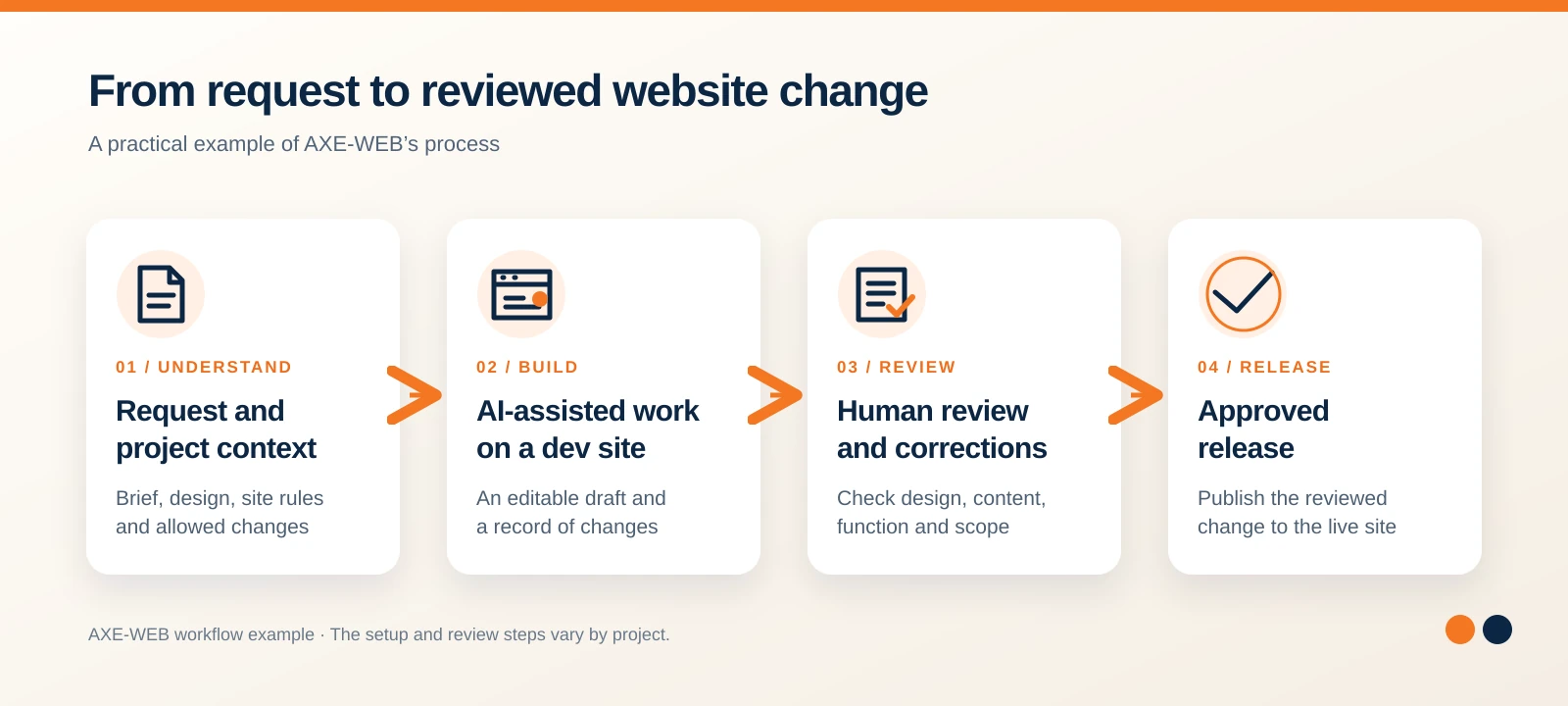
This process grew from our own integration work. It should not be confused with a list of features supplied by Elementor’s new MCP connection. The new platform tools are part of a broader direction we are already working in.
We have solved enough of the connection and coordination work to use this in our own delivery. We continue to improve it. Another team will have different tools, responsibilities, and client requirements, so its setup will need to reflect those differences.
Simpler for the team takes work behind the scenes
The aim is straightforward: a person should be able to describe a website change, receive something useful to review, and understand what happened.
Getting there means giving AI the right context. It needs to know which project it is working on, which design rules apply, what it may change, and when someone needs to approve the result. The people reviewing it need a working preview and enough information to assess the changes.
Without that structure, a team can end up copying information between more tools and spending its saved time correcting misunderstandings. The setup needs to reduce the total effort, including review and maintenance.
For us, a useful starting point is one recurring job: implementing an approved page design, preparing a content update, or applying a clearly defined change across a site. Make that process dependable, then expand it where it helps.
The completed work still needs to function as part of a real website. Forms, mobile layouts, tracking, and content editing need checking. We covered that production gap in “We built this Webpage with AI… Can we publish it?”. The tools have progressed since that article; the responsibility for the finished result remains.
Why we believe WordPress is here to stay
WordPress gives us access to the application, its content, its editing system, and the code around it. We can extend a site, connect external services, and adapt the workflow to the business. Its established editors also give clients a familiar way to manage the result.
That flexibility is valuable while AI tools are changing so quickly. A team can improve the assistant, add an integration, or change how work is coordinated while keeping a website that continues to serve the business.
There are still sites that need significant cleanup or a rebuild. Flexibility does not remove the cost of poor structure or years of neglected maintenance. It does, however, give teams options when deciding how to move forward.
Our confidence in WordPress comes from using those options. We have made AI part of our own WordPress delivery, and the platform’s developing AI infrastructure gives us more to build on.
How AXE-WEB can help
We build, maintain, and improve WordPress websites, and we can help companies and agencies bring AI into that work. This includes reviewing the current setup, connecting suitable tools, defining what AI can do, and establishing a practical review and release process.
We are open about how much our own process is changing. AI is taking on more implementation and repetitive work. Our role includes configuring that work, checking the result, and making sure it fits the website and the team responsible for it.
If your team is trying to make website delivery more efficient, talk to AXE-WEB about the work you want to simplify and the system you already have.
Frequently asked questions
No. AI can be connected to a WordPress project and used to create or update content in its existing structure. The available work depends on the site, editor, permissions, and integrations. A rebuild should follow the website’s requirements and condition.
Individual tools can handle useful tasks, but a complete agency workflow usually needs configuration across several systems. Designs, project context, access, review, and publishing all need to work together. A setup that works for one team may need adapting for another.
The Abilities API lets a WordPress site register actions with defined inputs, outputs, and permission checks. The official MCP Adapter makes deliberately exposed abilities accessible to compatible external AI tools. The actions available depend on what has been implemented and configured on the site. Abilities API · MCP Adapter
No. Its current support covers Atomic layouts. Elementor lists support for older Widget layouts as upcoming, so existing pages need checking before planning work around the connector. Elementor MCP
Yes. Someone needs to check the design, content, functionality, and scope of the changes. Publishing access also needs to match the intended approval process; it should not be assumed that every connection is restricted to drafts. Elementor permissions documentation
Yes. We can assess your existing website workflow and help establish suitable connections, project instructions, permissions, and review steps. The starting point is the recurring work your team wants to improve.